Friday, May 13, 2016

How to convert *.pfx cert to work with mikrotik

How to convert *.pfx cert to work with mikrotik

This was tested on RouterOS and with GlobalSign as ssl provider, Converted with Openssl.


Get Started to Convert

  • When you get your *.pfx cert you probably get something like this with cert IntermediateCA.cer
  • Start to rename IntermediateCA.cer to IntermediateCA.crt
  •  Save IntermediateCA.crt and GlobalSignRootCA for later upload to your RouterOS

Convert *.pfx cert

  • openssl pkcs12 -in yourcert.pfx -nocerts -out yourcert2016.key
  •  openssl pkcs12 -in yourcert.pfx -clcerts -nokeys -out yourcert2016.pem

Upload all files

  •  Upload all files to router > GlobalSignRootCA, IntermediateCA.crt, yourcert2016.key and yourcert2016.pem

After Upload you need to import in Mikrotik RouterOS

  • Jump in to your Mikrotik routerOS and import them in this order  GlobalSignRootCA, IntermediateCA.crt, yourcert2016.key and yourcert2016.pem and cert will be markt KLT mode in RouterOS ready to use.

Thursday, May 12, 2016

Top 10 Suggestions for Email Operators

Top 10 Suggestions for Email Operators

  • Stop all access attempts from IP Addresses with no reverse DNS at the connection level.
    Statistics show that approximately 20% of the most abusive attackers come from IP Addresses with no reverse DNS. Why let them connect to your SMTP daemon or worse accept anything they send you? Save your bandwidth and overhead, and block them. Often these are BotNets attempting to guess passwords, perform dictionary attacks, or send spam. Either the sender doesn't know how to set up a mail server, or they are up to no good. Most large ISPs block them at the connection level.
  • Stop all SMTP traffic, that has reverse DNS, which reflects home PC connections (ie. 0.0.127.mydialup.bigisp.com).
    Statistics show that over 50% of the most abusive attempts come from these type of connections. Make sure your SMTP daemon can tell the difference between inbound and customers emails - separate connections, SMTP AUTHENTICATION. Inbound mail should not come from an IP with that form of address. This can lower both your bandwidth and overhead, as well as provide 'Zero Day' protection against any new forms of spam.
  • Don't bounce email wherever possible (valid user checking and virus scanning).
    Senders are usually forged, and the only way you can notify a sender is during the SMTP connection. Do virus scanning, valid user checking, etc, all at the SMTP level. If you don't - you are adding to the problem, and you may find that your server gets blacklisted by others because of too many bounces.
  • Provide inbound connection limits on all services
    Hackers are always trying to brute force accounts, so protect all your services, not just your SMTP. A great technique is to set a default limit, and every time a password fails, count that as ten or 20 regular connection attempts. As well, by limiting your rates, you can catch abusers before they fill up your users' mailboxes, or overwhelm your servers.
  • Provide outbound rate limits on SMTP traffic
    This is the tool that would help most ISPs as more and more hackers compromise legitimate email accounts to send spam. Too many people still use 'test' and 'email' for passwords. As well, smarter trojan programs can use keyboard loggers to steal even the best passwords, or sniff the network for POP passwords which are sent via plain text. Without this you will find your email server blacklisted at some time point or another.
  • Enforce SMTP authentication
    Many ISPs still allow customers to relay outbound mail without SMTP authentication, which means that any trojan, or connection on your network can now send spam through your server at will. Too many ISPs don't want to ask their customers to change, but you can start the process now. Explain to them it helps stop infected PCs from spreading spam and that they will benefit from it.
  • Set up your Mail Server correctly (DNS, and HELO)
    Far too many smaller companies have mail servers that either do not have a correct reverse DNS that shows who they are, or have a misconfigured server identification (HELO). There are many "Best Practices" documents on this, but if you don't comply, don't complain when your email gets blocked by others.
  • Avoid Quarantining Email as much as possible
    This may be controversial, but hopefully you aren't blocking legitimate mail anyways. However, this can save you a lot of support calls, as well as overhead and bandwidth. Of course, if you are using filtering tools, this may be necessary, but you should try to block more, and filter less. When you block, the sender will see the reason the email got stopped, and can address it with their email administrator, instead of you having to answer to your customers. If you quarantine mail, and if it is spam, the sender believes the email got through, will send more, and maybe even sell the email address. And remember, if email data retention becomes law, do you want to store quarantined spam for who knows how many years?
  • Do not allow Default Catch All Addresses
    This used to be a handy feature, however now that spammers run dictionary attacks, and send from random addresses, it is easier to catch spammers when they fail valid user checking. When using default catch all addresses your servers will be hit extra hard.
  • Avoid acting as a backup MX for other companies
    First of all, the internet email protocols ensure that if a server is down, that other servers will queue mail and wait for your servers to come on line anyways, but when you are running as a backup MX, spammers tend to hit that first, before the main server, on the belief that the spam protection will be less. Also, you cannot run valid user checking, and other normal recommended spam checks easily. If you have to run as a backup MX for customers' own mail servers, DO NOT use your main mail server for this. You are better off running a permanent filtering service for your client, which can also act as a backup, rather than running in secondary mode.

Wednesday, March 23, 2016

Why IT Industry Need More Generalists Part (1 of 2)

IT Industry Need More Generalists

Part (1)

If IT shall become a strategic business partner then we will need culture change. And it starts with CIO / IT-manager and to look over our staff and hires personal that see and thinking in a broad spectrum. (The Generalist)

"The Best Specialists
are 
Generalists"

Sure, you might need a storage expert, but at the same time, you need someone who can see the big picture. storage, integration of networks and applications a "generalist". 
The best specialists are generalists. They are specialists for those passionate about a particular area. as an example network. They could keep on with the network all the time, but they are smart enough to understand that each technique and application to be connected to their network will affect it.
Therefore, they learn a lot about other areas. 

 Part (2) coming soon


Wednesday, January 13, 2016

From a pathetic to a kick-ass manager ? Top 11 hacks to become one!

Read and Consider 


The best part - These are  universal rules. These apply to leaders - irrespective of the region or country or industry or seniority - irrespective if you are a 1st time manager or experienced - if you are managing a small 3 member team or the CEO of a 100,000 people company - these apply to everybody.
  

11 things you can do to become an inspiring role model leader (or manager/ boss)


1. Don't steal credit


Something i learn't very early in my career - If your team does a great job - it directly reflects on your leadership. You don't have to steal their credit in order to prove your worth. It is very tough to not become greedy and wanting to keep all the limelight to oneself - but remember the king maker's job is different than that of the king.

There is a high chance that you have people more smarter and more capable than yourself on your team - stop feeling insecure - instead see if you can learn new things from them. see if you can "utilize" them to accomplish bigger challenges as a team. You stealing their credit or discrediting them will never stop them from reaching the higher position they deserve anyways. Instead give them a ladder to grow.

2. Give ownership (Btw - it means freedom to fail)


Ownership is a double edged sword. When you give ownership to someone - you give the freedom to fail. Most managers do not understand this, and as a result give "conditional" ownership -
"you can run with this as long as you can win the race !! "
This attitude does not really work. And this does not qualify for giving ownership ! 

Ownership is freedom to do things your own way. And freedom to succeed or fail. If you fail - learn from those mistakes in order to succeed the next time. It is an iterative process like learning to walk or cycle or swim. As a manager you need to sit back and watch. Restrain from interfering unless it is really needed to intervene. Know the difference ? No ? go google ...
Learning from one's own mistakes is very powerful, more effective and retains for a very long term - remember walking/cycling/swimming - we failed many times until one day we learn't the trick, and after that we never forgot how to do it right.

 3. Teach to fish


 Always focus on teaching people to do things versus doing it on behalf of them. Easier said than done when there is always pressure for quick results on the delivery side ? correct.
I used to struggle with this the most as an entrepreneur when you need super quick business results, have a lean team and have no patience for teaching or waiting. And it is very common to think that you are the most superior human on this planet and you can do everything better than the people around you. Don't fall for this mental illusion.
Think of it like this - one of the success mantras of a successful venture is scaling.  You can forget scaling if you are the one-and-only person in the team who can do that mission critical task. It is a must-have to be able to delegate and train others to do your job. Otherwise, you cannot move on to bigger and better challenges. You are kind-of stuck !!

4. Give honest feedback


Most managers shy away from giving a honest feedback, especially when things are not working well. there is a wrong assumption that giving a negative feedback will spoil relationships.
Firstly, feedback should "always" consist of 2 parts - 1. what is working & 2. what needs to be made to work.
Secondly, when talking about things-not-working focus on the task and not on the person. never say "you screwed up the project". instead say "the project did not go well because of these 3 reasons". And if things are not working well - do not wait for the cliche "performance appraisal" meeting. It is too late. Performance appraisal should be a summary and not involve any "surprises", and never the bad kinds. Telling the employee "You did a bad job for the whole of 2015" means you are a bad manager in the 1st place because you waited for 1 whole year !

5. Bad performers are not really bad


There are no "bad" or "useless" people. Each individual on this planet is good at something or the other. Keep that in mind. If someone is not performing well in their job - there could be 2 reasons - 1. Not motivated OR 2. In the wrong job.

Explore if it is case 1 - and see if you can fix it. Most times the reason for lack of motivation is not money - It is because you are not excited about the outcome of a job well done. Show the carrot and it need not be money always.

Many people are stuck in the wrong jobs for different reasons. Talk to them and see if you can help free them. As a manager you will do a big favor if you can have a candid chat about being stuck in the wrong job.

I always believe in this -
"You need to love what you do - if not - find something new that you will love to do"

As a boss it is not your failure if your employee decides to choose a different job. In-fact it is better to not have a demotivated & dis-grunted employee. Most times a bad job is worse than not doing the job.

6. Never criticize in public


Never (ever) criticize someone in public. You are a very bad boss if you shout at your people in public. I would give you a 0/10 rating !!
Remember the golden rule
" APPRECIATION  in PUBLIC and CRITICISM  in PRIVATE. always"
Think for a moment how you would feel if someone criticized you in public - in front of your colleagues. You would feel horrible, embarrassed, and resent that person. Does not serve the purpose. If you are not happy with something - please do express it. absolutely. but please get a room !! :-)

7. Keep personal relations outside


As a manager - each one of your team members are supposed to be equal to you. irrespective of the ethnicity, gender, language, skin-color, food choice, hobbies, pet movie star, political inclination, pet dog name, or any other common interest.
Do not do anything that will even give the slightest doubt that you will not give credit to job performance above everything else. If you have personal relationships - leave it locked outside the office space.

8. Don't make stupid promises


It is easy to get tempted to make false promises to get shit done. Bad idea because the long term repercussions will dent your credibility very badly.
for example -
"If you work late hours on this project - I shall promote you." 
Firstly, it is politically incorrect. Secondly - no company has a policy where you can promote your team member without approval from a few others  (i.e It is not 100% in your control). Thirdly, such policies are in place precisely to avoid such mistakes.
Also it is a question of integrity and credibility. You cannot expect your team to keep up their promise if you cannot keep up yours.
Many a times the intention behind such promises might be good, but circumstances or behind-the-screen challenges might not allow you to deliver on your promise. But all of that does not matter to the audience sitting in front of you. You still lose credibility.
Therefore remember - if you make a promise you better be in a solid position to keep it, else don't make that promise.

9. Practice what you preach


Be a role model. It is like parenting - if you have kids - you will relate to this. Remember how your kid copies you - how he/she picks up the foul language or bad behavior from you WITHOUT you teaching him/her ? ;-) In-fact, we get surprised how they learn things that they are not supposed to in-spite of us telling them that it is bad :-)
Same applies here. Don't preach "good behavior" while you do the opposite !! The trick is - don't preach - just practice and your kids will learn to be "as-good-as you".

10. Don't be mean


Be nice - We are all human beings and struggle with inter-personal challenges - at work and at home. give a patient hearing. be objective (versus subjective). Look at the context of things before reacting. Look at the root causes and help resolve them. I can go on and on here - but you know what being a good human being is all about.
But more important - Don't be mean - I have seen many nice bosses, but also a few mean bosses. People always go an extra mile for the nice boss, and you would do the opposite for the mean boss. This is universal truth. More importantly what goes out - comes back and bites you in the ass. If you are mean to people - it is plain stupidity to expect them to be nice to you. You get it !

11. Stay away from office gossip


Having said everything - the last but the most important rule - do not encourage office politics or snitching behind someone's back. Stay away from group-ism, inappropriate jokes and gossiping at all costs.
Do not get confused - being a good boss does not mean budding with your team by indulging in office gossip.  Don't muddle yourself into office politics. You need to be seen as someone who means serious business and does the right things. Indulging in office politics is guaranteed to take you many steps backward.
Doing the 10 things above is a much much better way to earn and keep the respect of your team.
 That's it for now ! Well this is not everything and i am sure there are more effective ones out there that i missed out. Looking forward to hear from you ...

Summary


In a nut-shell - At at time when talent shortage is common and lean teams are a norm - You need to be a super inspiring, rock solid leader for your high performing employees in order to be able to deliver stellar results !!
If you are not one already - it is very much possible to become one - by giving attention to the 11 golden rules above. 

========================================================================

 The original text is from:
 
Anupam Bonanthaya is a Technologist with passion for Marketing, People Entrepreneurship. 

Wednesday, October 7, 2015

Key differences between LXC and Docker

How they differ

 The idea behind Docker is to reduce a container as much as possible to a single process and then manage that through Docker. The main problem with this approach is you can't wish the OS away as the vast majority of apps and tools expect a multi process environment and support for things like cron, logging, ssh, daemons. With Docker since you have none of this you have do everything via Docker from basic app configuration to deployment, networking, storage and orchestration.
LXC sidesteps that with a normal OS environment and is thus immediately and cleanly compatible all the apps and tools and any management and orchestration layers and be a drop in replacement for VMs. 


If you want more info:

LXC

https://linuxcontainers.org
https://www.flockport.com

Docker

https://docs.docker.com

Monday, August 17, 2015

Duplicating Yum-based installation

Very handy if you need to duplicating installed software on yum-based Linux.
Perfect for upgrade from old hardware to newer or you just need a list of installed software. You can even upgrade specific packages on the same Linux Box in the same way.

Make list of installed software:

yum list installed |tail -n +3|cut -d' ' -f1 > installed_packages.txt

Copy installed_packages.txt to new Linux Box and run

yum -y install $(cat installed_packages.txt)

Wednesday, June 10, 2015

Routing Problem When Running BGP


Real life example of providers that's running own BGP. And did not set it up correct or didn't see the problem. This example will show a SIP provider that we get sip trunks from and what happens when they not got BGP routing right. Our customers started complaining that phone calls had jitter and some times was disconnected. Just before this problem we upgraded all core routers to latest firmware and for sure I started to get suspicious that this was the problem. But after some troubleshooting I went over to be suspicious for the SIP provider. I started to do some tests for one of the SIP server at provider side (we hade up to 300-350ms). And I could see we had very long respons time from our side. So next step was to talk to SIP provider and ask them to do tests. So they did tests and came up that they had no problem (13-25ms). Now you really start thinking it's your problem. But after one or two hours. I call SIP provider again and start to do some detective job talking to them. After littel talking they saying that they just installed I new Upstream and the are running ther own BGP and use the same Upstream provider. Now I start to understand the problem, but how will I prove it for them (SIP Provider). I call Upstream provider and explain the problem and ask if they could do tests and after two days they call me back and say tey find problem and had prove for it.

THIS IS THE ANSWER FROM UPSTREAM PROVIDER:

Nothing in troubleshooting indicating the failure of the customer (US). SIP provider has asymmetric routing for the moment when they only send traffic to their drop-off in City X but the Shortest Path to the route reflector of Upstream provider located in Stockholm and traffic routed then via Kista. As this debugging can not be driven by the (US) against Upstream provider and SIP provider must check its routing. Or make an Error reporting themselves to Upstream provider.
 
Tools used for troubleshooting:
  1. traceroute or tracert
Now I only need to get SIP provider to understand they doing it in wrong way


Monday, March 2, 2015

EoIP Real Life Exampels

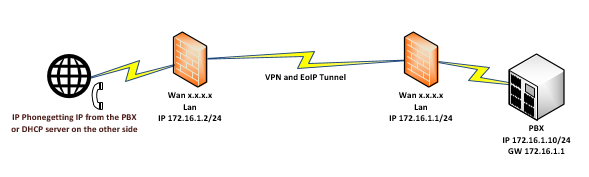
EoIP is a tunnel protocol designed to allows network easily connect private LANs located in different geographic location.

IP phones are great example where you can use EoIP to get simpel config and secure phone lines from phone to PBX.


a other good use of EoIP are when you need to move  IT resources such as servers or other hardware that can not be moved in one fell swoop. When  EoIP tunnel is up you can move client PC's and get IP from DHCP server on other side of your EoIP tunnel and still use all resources on other side.


Monday, February 23, 2015

Considerations when selecting your hypervisor

What does a hypervisor do?

A hypervisor is one of two main ways to virtualize a computing environment. By ‘virtualize’, we mean to divide the resources (CPU, RAM etc.) of the physical computing environment (known as a host) into several smaller independent ‘virtual machines’ known as guests. Each guest can run its own operating system, to which it appears the virtual machine has its own CPU and RAM, i.e. it appears as if it has its own physical machine even though it does not. To do this efficiently, it requires support from the underlying processor (a feature called VT-x on Intel, and AMD-V on AMD). One of the key functions a hypervisor provides is isolation, meaning that a guest cannot affect the operation of the host or any other guest, even if it crashes. As such, the hypervisor must carefully emulate the hardware of a physical machine, and (except under carefully controlled circumstances), prevent access by a guest to the real hardware. How the hypervisor does this is a key determinant of virtual machine performance. But because emulating real hardware can be slow, hypervisors often provide special drivers, so called ‘paravirtualized drivers’ or ‘PV drivers’, such that virtual disks and network cards can be represented to the guest as if they were a new piece of hardware, using an interface optimized for the hypervisor. These PV drivers are operating system and (often) hypervisor specific. Use of PV drivers can speed up performance by an order of magnitude, and are also a key determinant to performance.

Type 1 and Type 2 hypervisors – appearances can be deceptive

TYPE 1 native (bare metal)


A Type 1 hypervisor (sometimes called a ‘Bare Metal’ hypervisor) runs directly on top of the physical hardware. Each guest operating system runs atop the hypervisor. Xen is perhaps the canonical example. One or more guests may be designated as special in some way (in Xen this is called ‘dom-0’) and afforded privileged control over the hypervisor.

TYPE 2 (hosted)


A Type 2 hypervisor (sometimes called a ‘Hosted’ hypervisor) runs inside an operating system which in turn runs on the physical hardware. Each guest operating system then runs atop the hypervisor. Desktop virtualization systems often work in this manner. A common perception is that Type 1 hypervisors will perform better than Type 2 hypervisors because a Type 1 hypervisor avoids the overhead of the host operating system when accessing physical resources. This is too simplistic an analysis. For instance, at first glance, KVM is launched as a process on a host Linux operating system, so appears to be a Type 2 hypervisor. In fact, the process launched merely gives access to a limited number of resources through the host operating system, and most performance sensitive tasks are performed by a kernel module which has direct access to the hardware. Hyper-V is often thought of as a Type 2 hypervisor because of its management through the Windows GUI; however, in reality, a hypervisor layer is loaded beneath the host operating system. Another wrinkle is that the term ‘bare metal’ (often used to signify a Type 1 hypervisor) is often used to refer to a hypervisor that loads (with or without a small embedded host operating system, and whether or not technically a Type 1 hypervisor) without installation on an existing platform, rather like an appliance. VMware describes ESXi as a ‘bare metal’ hypervisor in this context.

Hypervisors versus Containers

It is mentioned that a hypervisor was one of two main ways to segment a physical machine into multiple virtual machines; the other significant method is to use containers. A hypervisor segments the hardware by allowing multiple guest operating systems to run on top of it. In a container system, the host operating is itself divided into multiple containers, each running a virtual machine. Each virtual machine thus not only shares a single type of operating system, but also a single instance of an operating system (or at least a single instance of a kernel).

 Virtualization using containers


Virtualization using hypervisors  


Containers have the advantage of providing lower overhead (and thus increased virtual machine density), and are often more efficient particularly in high I/O environments. However, they restrict guest operating systems to those run by the host (it is not possible, for instance, to run Windows inside a container on a Linux operating system), and the isolation between virtual machines is in general poorer. Further, if a guest manages to crash its operating system (for instance due to a bug in the Linux kernel), this can affect the entire host, because the operating system is shared between all guests.

Considerations when selecting a hypervisor

 Clearly from the above, the performance and maturity of the hypervisor are going to be important considerations.

Four hypervisors under review


KVM is a Linux based open source hypervisor. First introduced into the Linux kernel in February 2007, it is now a mature hypervisor and is probably the most widely deployed open source hypervisor in an open source environment. KVM is used in products such as Redhat Enterprise Virtualization (RHEV).


Xen is an open source hypervisor which originated in a 2003 Cambridge University research project. It runs on Linux (though being a Type 1 hypervisor, more properly one might say that its dom0 host runs on Linux, which in turn runs on Xen). It was originally supported by XenSource Inc, which was acquired by Citrix Inc in 2007.

VMware is (as previously trailed) not a hypervisor, but the name of a company, VMware Inc. VMware’s hypervisor is very mature and extremely stable. It is a trusted brand that delivers excellent performance in terms of running servers, though on most loads the difference between VMware and other hypervisors is not huge. The performance (for instance time to create or start a server), however, is in general worse than either KVM or Xen.


Hyper-V is a commercial hypervisor provided by Microsoft. Whilst excellent for running Windows, being a hypervisor it will run any operating system supported by the hardware platform.
As a commercial hypervisor, the licensee must bear the cost of licensing Hyper-V itself. However, many licensees with Windows SPLA licenses see this as included within the organizations Windows licensing costs. Further, Microsoft offers preferential pricing on guest operating systems running inside Hyper-V, which in some cases may offset this cost.

Summary

Best hypervisor for you will depend on your circumstances. Typically we find traditional hosting providers and those cloud service providers that are particularly sensitive to cost or density prefer the open source hypervisors (KVM or Xen), with KVM being the most popular. Managed service providers whose customers are sensitive to branding considerations or require the enterprise style storage integration of VMware prefer that as a hypervisor. Recently we have seen Windows focused providers use Hyper-V, normally on a subset of clusters within a multi-cluster deployment.

Friday, January 2, 2015

NTP solution with vrrp to secure time sync for 800 vm

How to get 800 vm and infrastructure to sync the time in a safe manner. When you see the customer only has one poor NTP server that can not meet all of the time sync requests. And for sure if this one fails every thing will fails. No problem you thingking we just get one more NTP server,
then you begin to realize what a job this would be to config 800 vm and infrastructure to sync on
secondary NTP server. No problem you solve this with two routers, two NTP servers and a vrrp.


Now you have a failover and don't need to reconfigure 800 vm and infrastructure for NTP sync.
You need to use routers that can be NTP servers. Now you sync your servers and infrastructure against one of the active Routers in the VRRP.

Thursday, January 1, 2015

EoIP or Ether over IP

EoIP or Ether over IP tunnel is a tunnel protocol designed by Mikrotik which allows network administrators to easily connect private LANs located in different geographic location. As long as the Mikrotik routers can ping each other, we can create the EoIP tunnel among them. EoIP can be used with VPN but I will show a very simpel EoIP tunnel setup in this exampel.


R1:

Public IP: 50.60.50.58/29 (assigned to ether1)
Default Gateway: 50.60.50.57
LAN IP: 192.168.100.0/24
EoIP tunnel IP: 10.10.10.1/30 (assigned to EoIP_R1)

R2:

Public IP: 60.50.60.50/29 (assigned to ether1)
Default Gateway: 60.50.60.49
LAN IP: 192.168.101.0/24
EoIP tunnel IP: 10.10.10.2/30 (assigned to EoIP R2)

I assume that you have configured the internal LAN so it can connect to internet (masquerade the private IPs to the public interface).

 Configuration on for R1 and R2:

R1:

/ip address add address=50.60.50.58/29 interface=ether1

/ip route add dst-address=0.0.0.0/0 gateway=50.60.50.57

/ip firewall nat add action=masquerade chain=srcnat out-interface=ether1 src-address=192.168.100.0/24

/interface eoip add name=EoIP_R1 remote-address=60.50.60.50 tunnel-id=10

/ip address add address=10.10.10.1/30 interface=EoIP_R1

/ip route add dst-address=192.168.101.0/24 gateway=10.10.10.2

R2:

/ip address add address=60.50.60.50/29 interface=ether1

/ip route add dst-address=0.0.0.0/0 gateway=60.50.60.49

/ip firewall nat add action=masquerade chain=srcnat out-interface=ether1 src-address=192.168.101.0/24

/interface eoip add name=EoIP_R2 remote-address=50.60.50.58 tunnel-id=10

/ip address add address=10.10.10.2/30 interface=eoip1

/ip route add dst-address=192.168.100.0/24 gateway=10.10.10.1

After you finish the above configuration, you should be able to ping from PC1 to PC2 / PC2 to PC1

Sunday, October 26, 2014

Tools That Could Be Handy To Have

Tftpd32:

Tftpd32 is a free, opensource IPv6 ready application which includes DHCP, TFTP, DNS, SNTP and Syslog servers as well as a TFTP client. The TFTP client and server are fully compatible with TFTP option support (tsize, blocksize and timeout), which allow the maximum performance when transferring the data.

Here you can find Tftpd32:
http://tftpd32.jounin.net/

WinSCP:

It is award-winning SFTP client, SCP client, FTPS client and FTP client integrated into one software program for file transfer to FTP server or secure SFTP server.

 
Here you can find WinSCP:
http://winscp.net/

PuTTY:

PuTTY is an SSH and telnet client, developed originally by Simon Tatham for the Windows platform. PuTTY is open source software that is available with source code and is developed and supported by a group of volunteers.

Here you can find PuTTY:
http://www.putty.org/

Rufus:

Rufus is a utility that helps format and create bootable USB flash drives, such as USB keys/pendrives, memory sticks

Here you can find Rufus:
http://rufus.akeo.ie/

ImgBurn:

ImgBurn is a lightweight CD / DVD / HD DVD / Blu-ray burning application that everyone should have in their toolkit!

 
Here you can find ImgBurn:
http://www.imgburn.com/

Subnet Calc:

The SolarWinds Free Advanced Subnet Calculator is completely free and fully functional. In fact, it actually delivers four tools in one

Response Time Viewer for Wireshark:

Quickly analyze Wireshark packet capture file to troubleshoot performance issues


Here you can find SubnetCalc/Response Time Viewer for Wireshark:
http://www.solarwinds.net/

 
Wireshark:

Wireshark is the world's foremost network protocol analyzer. It lets you see what's happening on your network at a microscopic level. It is the de facto (and often de jure) standard across many industries and educational institutions.


Here you can find Wireshark:
https://www.wireshark.org/


Friday, October 24, 2014

Atlas Probe from RIPE

As LIR I have chosen to get an Atlas Probe from RIPE. What is now an Atlas Probe?  RIPE NCC is building the largest Internet measurement network ever made. RIPE Atlas employs a global network of probes that measure Internet connectivity and reachability, providing an unprecedented understanding of the state of the Internet in real time.


Here you can read more about Atlas Probe:
https://atlas.ripe.net/

You can reach my Atlas Probe here:
https://atlas.ripe.net/probes/17334/

PXE Server on RouterOS

Ability to provision Operating Systems and boot iso over network are very useful I will show you one way with Mikrotik RouterOs as PXE Server. Any Mikrotik can become PXE server and are very handy. (Small form factor) We will use one Mikrotik with USB, because we will PXE boot bigger ISO images than Mikrotik can handle without USB. Sure you can use RouterOs for x86 and then you don't need USB only big internal HD for your ISO's. See www.mikrotik.com

Install and booting machines using RouterOS as bootp/tftp server is simple process if you done PXE booting before, for those that have not, allow me to provide a basic guide along with a package that's comes from this artikel See www.mikrotik-routeros.com/2013/02/routeros-as-a-pxe-net-boot-server/
I made some small changes from original artcle, booting bigger ISO's than 32Mb and use USB for PXE files.

What do we need:
  1. Mikrotik any kind with USB
  2. USB or USB HD
  3. Mikrotik with working DHCP
I will use Mikrotik 751G with USD Flash Memory for PXE boot images bigger than 32Mb. Plug in your USB and start your router, login with winbox and prepair your USB or USB HD for use in RouterOs

Prepair USB:

System
            Stores
                       Disks
                                Format Drive


Copy Files:

When drive is OK, go to Files and copy all files from package to router 
( Package  include mini.iso ubuntu) so if you want any other boot images you need to download any OS ISO and rename it to mini.iso and upload to router) I use CentOs 7 in my exampel.
 
Files
 
 
Fix Limit On 32Mb:
 
My ISO is CentOs 7 bigger than the limit on 32Mb as boot images. So you need to fix this with command Set "allow-rollover=yes" to let your router to handel bigger images than the limit.
 
Edit Variables:
 
#First copy the entire tftp directory to your MikroTik root or USB disk directory
#Then edit these variables to suit your local network

:global network "192.168.88.0/24"
:global router "192.168.88.1"

#Adding TFTP allowances for the provided range

/ip tftp
add ip-addresses="$network" real-filename=usb1/tftp/pxelinux.0 req-filename=pxelinux.0
add ip-addresses="$network" real-filename=usb1/tftp/bootmsg.txt req-filename=bootmsg.txt
add ip-addresses="$network" real-filename=usb1/tftp/memdisk req-filename=memdisk
add ip-addresses="$network" real-filename=usb1/tftp/pxelinux.cfg/default req-filename=pxelinux.cfg/default
add ip-addresses="$network" real-filename=usb1/tftp/mini.iso req-filename=mini.iso

 DHCP Settings For PXE:
 
#We assume there is an existing DHCP server setup, so just modifying the network config /ip dhcp-server network set [find address="$network"] boot-file-name=pxelinux.0 next-server="$router"
Or just use IP of router.
 
IP
   DHCP Server
                        Networks


Ready To Go:

boot up your hardware for PXE boot and select which images to boot from. If you have space on your router you can have many diffrent ISO's and you can easily fix boot screen to have multipla choices for your ISO files. (Files you need to edit are \tftp\pxelinux.cfg\default and \tftp\bootmsg.txt)

Friday, September 26, 2014

Tools For Migrate File Servers

In a server migration, if you have a lot of files to move and have to move them in full operation or with a minimum of down time this tools will help you. (sure there are more of this kind)
Use Ycopy to make first copy of all your folders and files. Ycopy gets around all of the problems of Windows/dos Windows Explorer, copy and xcopy programs. With these tools, Long filenames, long paths, corrupted files and errors, cause them to just stop. Ycopy just logs these and goes on. First copy of folders and files will be your master copy and for sure take some times if you huge amounts of data. Next tools you will use is Total Commander just before you must turn off the server you are about to migrate. Use Total Commander to verify the folders and files to just copy over folders and files with changes., this means that at a migration will have minimal down time.


You can find Tools here:

Ycopy: It seems that it is difficult to find Ycopy for download from http://www.ruahine.com/

Total Commander: